

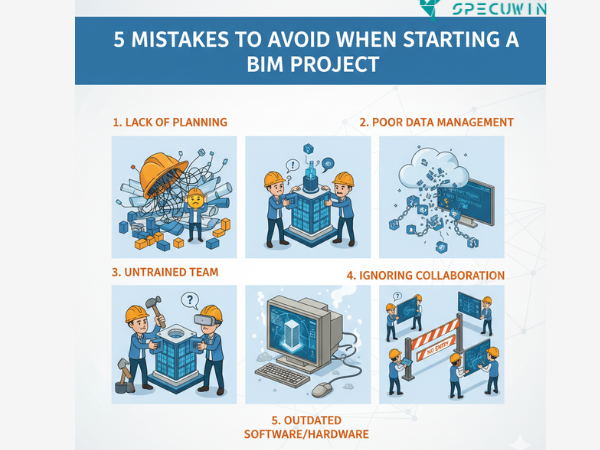
Building Information Modeling (BIM) is more than just a piece of software; it’s a revolutionary process that changes how we design, construct, and manage buildings. The promise of BIM enhanced collaboration, clash detection, and accurate data for the entire lifecycle is incredibly compelling. Implementing a successful BIM workflow means moving away from a siloed, 2D world and embracing a unified, data-rich 3D environment for successful BIM project
However, the path to mastering BIM can be fraught with pitfalls. Like any major digital transformation, the biggest challenges often aren’t the technology itself, but the human processes and strategies surrounding it. Many firms eagerly invest in the software and then wonder why they aren’t seeing the promised return on investment.
The truth is, realizing the genuine value of professional BIM Services requires a fundamental shift in mindset and a meticulous approach to project setup. This article cuts through the complexity to highlight the five most common, and costly, mistakes project teams make at the very start of their BIM journey. Avoid these, and you set your project up for success.

Mistake 1: Skipping the BIM Execution Plan (BEP):-
Imagine setting off on a complex journey without a map, a shared language, or even an agreed-upon destination. That is exactly what happens when a team dives into a BIM project without a formal BIM Execution Plan (BEP). This is arguably the single most critical oversight. Many teams, especially those new to BIM, mistakenly believe the BEP is only for large-scale, complex projects, or they create one that is so overly complicated it becomes impossible to follow.
The Human Reality: When you don’t have a BEP, you have “Collaboration Chaos”. Architects model what they think is right, engineers assume standards that aren’t defined, and the contractor is left trying to piece together conflicting information. Roles, responsibilities, and even the simple stuff like file naming conventions become a free-for-all.
How to Fix It and Maximize Your BIM Services:
- Define Goals First: Your BEP should start with clearly outlining the project goals and objectives. Why are you using BIM? Is it for clash detection, quantity take-offs, or facility management data? The answer dictates everything else.
- Establish the Rules of Engagement: The BEP must clearly define roles, responsibilities, software platforms, data exchange protocols, and version control. You need a simple, clear layout that all stakeholders from designers to contractors can easily understand and agree to.
- Embrace Open BIM: Ensure your plan supports open standards to break down proprietary software silos and foster better collaboration across disciplines.
Read more on:- BIM for Beginners: A Guide to Getting Started in Building Information Modeling
Mistake 2: Confusing 3D Modeling with True BIM Services:-
This is the most common philosophical error: treating the BIM model as a static, digital drawing set rather than a dynamic, data-rich database. The model is often used only for visualization, ignoring its true power to integrate scheduling (4D), cost estimating (5D), and facilities management (6D).
The Human Reality: If you treat BIM as “just 3D,” you’ve simply invested heavily in a better drafting tool. You miss the opportunity to leverage the quantitative data embedded in the model. This limits your return on investment and means you’re essentially paying for premium BIM Services but only using the most basic functionality. The real value of BIM is in the ‘I’ the Information.
How to Fix It and Leverage Information:
- Think Data, Not Just Geometry: Ensure your project focuses on populating model elements with meaningful, non-geometric information—material specs, supplier details, maintenance schedules that will be useful long after construction is complete.
- Define LOD (Level of Detail/Development): Establish clear Level of Development (LOD) requirements at the outset. This prevents the wasteful mistake of Over-modeling (adding unnecessary detail that bloats the file) or Under-modeling (leaving out critical information). The detail level must align with the current project stage.
- Plan for Post-Construction Use: From the start, talk to the facility managers. What data do they need? Ensure the BIM model is a functional digital twin that provides lasting value for maintenance and operations.
Mistake 3: Neglecting Interdisciplinary Coordination and Clash Detection Early On:-
One of BIM’s superpowers is identifying conflicts before they become expensive, time-consuming rework on the job site. However, many teams wait until the design is almost finalized to run their first clash detection report. This is a “Coordination Catastrophe”.
The Human Reality: Waiting to detect clashes is the equivalent of trying to perform emergency surgery on a design. You’re forced to make rushed, costly fixes to solve conflicts between the structural beam, the MEP ductwork, and the architectural design. This leads to confusion, finger-pointing, and project delays. The entire point of adopting professional BIM Services is to make coordination a proactive, integrated process.
How to Fix It with Proactive Coordination:
- Clash Early and Often: Integrate clash detection tools (like Navisworks or similar) into your weekly workflow from the schematic design phase onward. Don’t wait for a design freeze.
- Prioritize Issues: Not all clashes are created equal. Develop a clear hierarchy to focus on high-priority issues (like a structural beam vs. a major pipe) before low-impact conflicts (like a light fixture vs. a wall partition).
- Use a Common Data Environment (CDE): Implement a cloud-based platform to ensure all project stakeholders have real-time access to the most current model. This eliminates the risk of working with outdated files.

Mistake 4: Insufficient Training and Failing to Upskill the Team:-
Adopting BIM is not merely installing new software; it requires a new set of skills and a completely new workflow. A common, and budget-killing, mistake is assuming that existing staff can simply pick up the new tools without dedicated, customized training. New software with old skill sets is a major roadblock.
The Human Reality: A lack of proper training leads to frustration, errors in modeling, poor data management, and a high reliance on old, analog processes, even when using digital tools. People will revert to what they know trying to use a 3D model like a 2D CAD file which completely negates the advantages of BIM. Without a skilled BIM Services team, the technology becomes a liability, not an asset.
How to Fix It with Strategic Training:
- Invest in Role-Based Training: Recognize that the architect, the engineer, and the BIM manager all require different types and levels of training. Customize programs to be practical and directly applicable to their daily roles.
- Embrace Continuous Learning: The technology evolves rapidly. Budget for ongoing education, workshops, and upskilling to ensure your team remains proficient in the latest tools and methodologies.
- Hire a BIM Manager/Coordinator: Have a dedicated professional whose primary job is to oversee the BIM process, enforce standards, report clashes, and ensure the team is adhering to the BEP.
Read more on:- BIM Training: The Smart Gateway to a Future-Ready AEC Career
Mistake 5: Poor Data Management and Inconsistent Naming Conventions:-
At its core, BIM is about structured data management. A frequent mistake is failing to establish and enforce clear standards for how files, families, and objects are named, stored, and updated. This leads to “Information Overload” and distrust in the model’s accuracy.
The Human Reality: Imagine searching a project folder with hundreds of files named “Final_Model_V3_Final_Rev_New” and “Beam_1.” When multiple team members work on the same model, inconsistent data management quickly leads to confusion, duplicated work, and the worst-case scenario: working from an outdated model. Disorganized file management destroys trust in the model’s single source of truth.
How to Fix It with Standardization:
- Standardized Naming is Non-Negotiable: Establish a simple, clear, and descriptive naming convention for all files, layers, and objects, and enforce it consistently across the entire project team.
- Use a CDE for Version Control: Utilize a Common Data Environment (CDE) with automated version control and approval workflows. This ensures there is a single source of truth for all project data and reduces the risk of working on duplicated or outdated models.
- Focus on Structured Data: Implement strategies to categorize and prioritize information to streamline data for effective decision-making, transforming chaos into clarity.

Conclusion:-
Building Information Modeling offers unparalleled advantages in project delivery, promising enhanced collaboration, cost reduction, and superior quality control. The key to unlocking these benefits is recognizing that BIM is a process transformation, not just a software update. By meticulously planning your BIM Execution Plan, prioritizing data over simple 3D geometry, proactively clashing, investing in people, and maintaining rigorous data standards, you transform potential pitfalls into powerful assets.
Adopting professional BIM Services is your pathway to a more efficient, less risk-prone future in the AEC industry. Start smart, and your project will finish strong.
FAQ’s:-
1. What is the single most important step before starting a BIM project?
A. The most critical step is developing a clear and concise BIM Execution Plan (BEP). This document serves as the project’s roadmap, defining goals, software, data standards, and most importantly the roles and responsibilities of every team member to ensure alignment.
2. What does “Level of Development (LOD)” mean, and why is it important to define early?
A. LOD defines the amount of geometric detail and non-geometric information required for each element of the model at specific project stages. Defining LOD prevents the twin mistakes of over-modeling (wasting time on unnecessary detail) and under-modeling (omitting critical information needed for construction or fabrication).
3. Why is internal staff training so crucial when implementing BIM?
A. BIM requires new skills and new collaborative workflows that differ significantly from traditional 2D processes. Insufficient training is a major stumbling block because it leads to errors, poor data management, and teams falling back on old, inefficient work habits, thereby limiting the returns from your investment in BIM Services.
4. When should we start doing clash detection?
A. Clash detection should be performed early and often, ideally starting during the schematic design phase. Waiting until late in the project to run tests leads to expensive, time-consuming rework on-site. Proactive, regular clash detection is essential to realize BIM’s cost-saving benefits.
5. How is BIM different from just making a 3D model?
A. A 3D model is just geometry. BIM (Building Information Modeling) is a data-rich digital twin. The model elements are tied to non-geometric information (specifications, cost, time, maintenance data), allowing it to be used for 4D scheduling, 5D cost estimation, and 6D facility management, extending its value far beyond basic visualization.
Read More On:-
For more information about engineering, architecture, and the building & construction sector, go through the posts related to the same topic on the Specuwin Blog Page.
Find out more accurately what we are going to take off in the course of applying leading new technologies and urban design at Specuwin.