

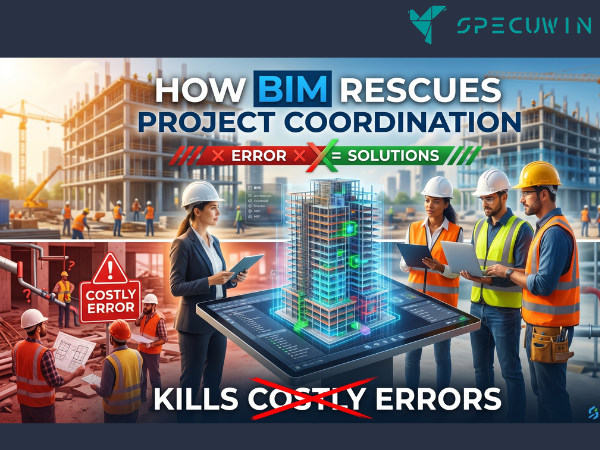
I am tired. My eyes are burning from staring at red-lined PDFs, and if I have to handle one more emergency site call because a duct is trying to occupy the exact same physical space as a structural steel beam, I might just walk into the woods and never return. Look, construction is chaotic. But it doesn’t have to be a multi-million dollar game of guessing. For decades, we relied on 2D drawings. We overlaid flimsy pieces of paper, held them up to the light, and prayed to the engineering gods that nothing clashed. Spoiler alert: everything clashed.
Let me tell you about a nightmare that still keeps me up at night. A few years ago, before we fully integrated BIM, I was on a high-rise commercial project. We were moving fast too fast. The mechanical contractor fabricated three floors worth of custom HVAC ductwork based on an approved 2D layout. Guess what? The structural team had slightly thickened a set of transfer beams to handle dynamic loads, a change that never quite registered on the flat MEP drawings. When the ducting arrived on site, it didn’t fit. It wasn’t even close. We had to halt work, scrap thousands of dollars of galvanized steel, and spend a week pointing fingers. That was the exact moment I realized that traditional Project Coordination was a broken, outdated illusion.
Why 2D Drawings Are Ruining Your Project Coordination:-
Flat drawings lie to you. They hide reality in the gaps between pages. When you pass 2D CAD files around, you aren’t collaborating; you are playing a high-stakes game of telephone.
The Illusion of a Clash-Free Design:
An architect draws a wall. A structural engineer places a column. A mechanical contractor routes a pipe. On separate sheets, everything looks pristine. But when those elements collide in the real world, the illusion shatters. You suddenly get hit with a tidal wave of Change Orders.
Advanced modeling completely flips this script. Moving from 2D to 3D means you see the physical reality of the building before a single ounce of concrete is poured. You shift from reactive firefighting to proactive planning. This visual clarity changes the entire workflow. Contractors see exactly where the tight squeezes are. Clients finally comprehend why certain structural elements, like heavy column sizing or massive transfer slabs, are mathematically necessary. It takes the guesswork out of the equation.
The BIM Revolution: Unifying Project Coordination:-
Building Information Modeling isn’t just fancy 3D software. It is a single source of truth. It forces every stakeholder to work inside the exact same digital ecosystem.
Clash Detection: Finding Mistakes in Pixels, Not Concrete:
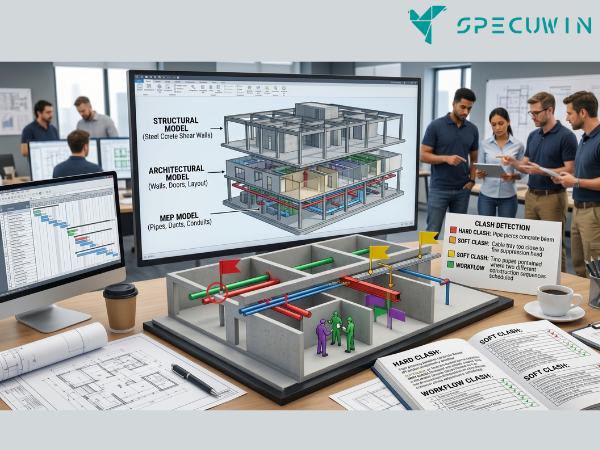
This is where the magic happens. By pulling structural, architectural, and MEP models into a unified space using tools like Navisworks, we can run automated clash detections. The software spits out a report of every single time a pipe pierces a beam or a conduit blocks a doorway.
- Hard Clashes: Physical geometry overlap, like a plumbing line cutting through a concrete shear wall.
- Soft Clashes: Spatial or clearance violations. Think of a valve that can’t open because a cable tray is blocking it.
- Workflow Clashes: 4D scheduling conflicts where two crews are scheduled to work in the same tight corner at the same time.
Fixing a clash in a digital model takes five minutes and a few clicks. Fixing that same clash on-site requires jackhammers, welding torches, structural retrofitting, and a massive hit to your budget.
Maximizing ROI Through Seamless Project Coordination:
It pays off. Studies show that proper model coordination can slash construction contingency costs by over 10%. When you utilize strict protocols like an explicit BIM Execution Plan (BEP), everyone knows their responsibilities. You eliminate the classic on-site mistakes that drive structural engineers crazy.
Smarter Workflows for Modern Demands:-
The construction landscape is changing fast. We are dealing with tighter urban sites, complex geometry, and aggressive schedules.
From Clash Detection to Seamless Coordination:
True coordination is about more than just finding errors; it is about creating a fluid communication loop. When structural engineers and architects collaborate closely during the early concept phase, the entire building fabric benefits. You stop over-designing elements out of fear. Instead, you optimize your material bills.
This collaborative approach is critical when deploying advanced systems like Post-tensioned slabs or modular pre-cast walls. Because post-tensioning involves high-strength steel tendons under extreme tension, you cannot simply drill a hole through a cured slab later if an MEP line was misplaced. The coordination must be flawless from day one. BIM gives you that exactness. It allows teams to simulate complex construction sequences, integrate real-world soil testing constraints, and build structures that endure.
Frequently Asked Questions:-
1. How does BIM improve Project Coordination on smaller construction sites?
A. Small projects suffer from tight budgets where even minor errors cause ruinous delays. BIM scales down beautifully, letting small teams visualize spatial constraints, accurately estimate material quantities, and prevent spatial conflicts before mobilization.
2. What is the difference between a hard clash and a soft clash?
A. A hard clash happens when two components physically occupy the same space, like a steel column slicing through a duct. A soft clash occurs when an object violates necessary buffer zones or clearance codes required for maintenance access.
3. Can BIM help reduce structural material waste?
A. Yes. By precisely modeling reinforcement bars, steel profiles, and concrete grades, engineering teams can optimize steel tonnage and accurately calculate concrete volumes. This drastically cuts down on job site over-ordering and structural waste.
4. Why is a BIM Execution Plan (BEP) necessary for Project Coordination?
A. A BEP acts as the project manual. It defines the standard protocols, data formats, software versions, and specific responsibilities for every stakeholder, ensuring the federated model remains accurate and reliable.
5. How does 4D BIM differ from standard 3D modeling?
A. Standard 3D BIM focuses entirely on spatial geometry. 4D BIM adds the element of time to the model, linking construction schedule sequences directly to the digital components to visualize the build process step-by-step and spot scheduling conflicts.
Read More On:-
For more information about engineering, architecture, and the building & construction sector, go through the posts related to the same topic on the Specuwin Blog Page.
Find out more accurately what we are going to take off in the course of applying leading new technologies and urban design at Specuwin.